Set Up an Online Shop and Sell Now

Updated: Jan 28
Turn Browsing Into Buying
Someone arrives ready to browse.
They scroll. They scan. They compare.
In those first moments, the shop either carries them forward or quietly loses them.
An online shop works best when everything feels obvious. Products are easy to find. Information answers the right questions. Moving from interest to purchase feels familiar and unforced. When that flow holds, people keep going.
This page sets the rhythm of the buying experience. A clear product layout, dependable filters, and a smooth path to checkout protect momentum and turn browsing into buying.
When the shop works, sales start earlier and improve faster. Everything else builds from there.
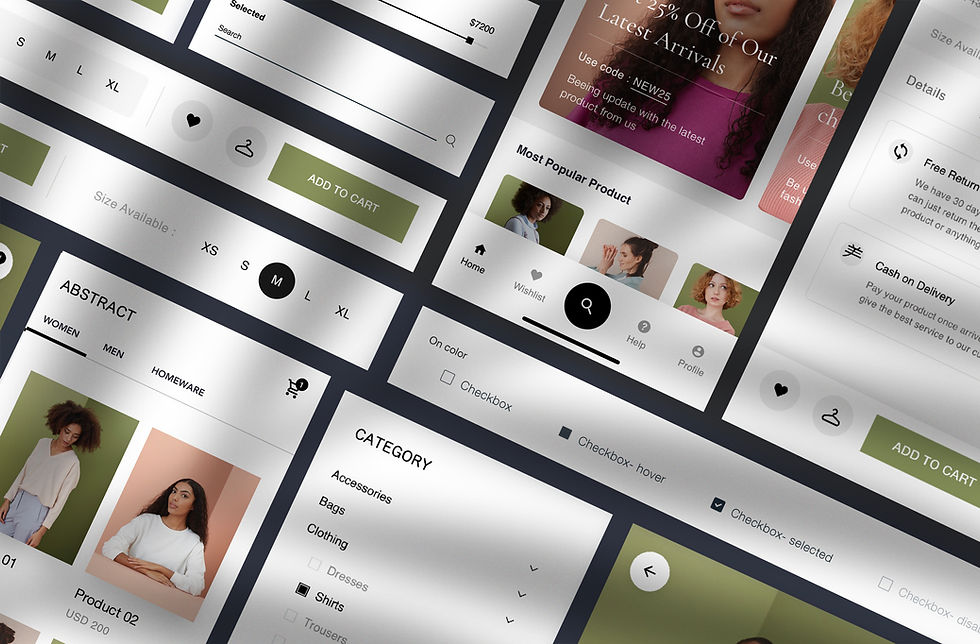
What Is an Online Shop Page?
An online shop page is where products are displayed, compared, added to cart, and purchased.
It’s the starting point for the entire buying journey — not just a catalogue.
Most effective shops include:
A clean product grid
Clear images and pricing
“Add to cart” actions that are easy to spot
Category filters and search
A clear path to cart and checkout
Well-performing shops keep management simple behind the scenes and navigation simple on the front end. Large brands succeed by focusing on clarity and speed rather than overdesign.
Why This Page Matters Commercially
An online shop isn’t just a feature — it’s revenue infrastructure.
A well-built shop:
Enables sales around the clock
Meets customer expectations for fast checkout
Performs reliably on mobile, where most purchases now happen
Builds trust through clarity, consistency, and social proof
When the shop doesn’t work properly, the website becomes informational instead of transactional. Interest stalls before it ever turns into revenue.
What Makes a Good Online Shop Page
A good online shop page feels simple to use, even when the catalogue is large.
People can land, understand what you sell, find what they came for, and move toward checkout without stopping to think.
Strong shop pages usually have:
A clean product grid
Consistent cards, consistent spacing, and no visual clutter. The goal is fast scanning.
Clear product information at a glance
Product name, price, key variations (size/colour), and availability shouldn’t be hidden.
Helpful filters and search
Categories that make sense, filters that reflect how customers shop, and a search bar that works properly.
Fast, mobile-first layout
Most browsing happens on a phone. Buttons need to be thumb-friendly, pages need to load quickly, and the grid needs to stay readable.
A confident path to purchase
“Add to cart” is obvious. Cart is easy to find. Checkout feels short and familiar.
Trust signals where they matter
Reviews, shipping/returns clarity, secure checkout cues, and consistent branding reduce hesitation at the exact moment people decide.
When these fundamentals are in place, your shop starts doing its job quietly: keeping momentum high and letting buying feel natural.
Before You Build
Have these ready before setup begins:
High-quality product images
Clear pricing and product titles
Categories and tags for filtering
Button copy (“Add to cart”, “Buy now”)
A mobile testing plan
Optional trust signals (reviews, stock indicators)
Preparation here prevents friction later.

How to Set Up an Online Shop Page:
Step by Step
Step 1: Build Your Product Grid
Choose your platform (Shopify, WooCommerce, Wix).
Add all products with images, titles, and prices.
Organise into a clean grid format.
Result: Shoppers see everything clearly at a glance.
Step 2: Add “Add to Cart” and Checkout Flow
Place an “Add to Cart” button under every product.
Link to cart with quantity and pricing displayed.
Include a clear CTA to checkout.
Result: Buying feels effortless, not confusing.
Step 3: Enable Search and Filters
Add a search bar for direct product lookup.
Create filters (categories, price ranges, tags).
Result: Shoppers find what they want without frustration.
Step 4: Optimise for Mobile
Test grid and checkout on different devices.
Make sure buttons are thumb-friendly.
Result: Customers can buy anytime, anywhere.
Step 5: Add Conversion Boosters
Include ratings/reviews for social proof.
Use urgency triggers (“Only 2 left in stock”).
Display bestsellers with badges.
Result: Shoppers feel confident to buy now, not later.
When you’ve done these steps, your online shop goes from static to a selling machine.

Common Mistakes That Hurt Sales
Most issues come from overlooking basics.
Common problems include:
No search, forcing endless scrolling
Poor product images that reduce trust
Mobile layouts that break or feel cramped
Checkout flows with too many steps
Each of these creates friction at the moment it matters most.
When It’s Time to Invest in Getting This Built Properly
An online shop sits at the centre of your growth engine.
Performance depends on more than listing products. Page structure, load speed, mobile behaviour, checkout flow, SEO foundations, and how the shop connects to the rest of the site all affect conversion.
When this is built by people who understand growth systems — not just store setup — it pays for itself. A well-built shop increases conversion rates, reduces abandonment, and makes future optimisation easier as the business grows.
That’s a strategic investment, not a cosmetic one.
What It Costs and How Long It Takes
Here’s what founders usually face:
DIY / In-house: $0–$100 AUD per month; 5–10 hours setup. Basic online shop features in Shopify/Wix.
Template/Resource: $100–$500 AUD; 3–6 hours. Pre-built e-commerce templates with product grids.
Professional / Done-for-you: $1,500–$5,000 AUD; 2–4 weeks. A designer builds a custom, branded online shop - includes SEO optimisation etc...
Mentor Tip:
Add urgency tags like “Limited Stock” or “Bestseller”—they convert browsers into buyers.
What You Can Do Next
⬇️ Download the eCommerce Launch Pack. Store Setup Blueprint, Product Card Template, Checkout Flow Map, Trust Signal Checklist, and Post-Sale Automation Guide. Build a shop that looks premium and performs like it.
✅ Launch a store that sells, not stalls. We design, build, and optimise online shops with proven product flow, payment simplicity, and conversion logic baked in. You focus on the offer; we make checkout effortless.
✅ Sell smarter from day one. StartupDeck helps you construct pricing, packaging, and offer flow before launch — so your first 100 visitors feel like 1,000.

The Bottom Line
An online shop is no longer optional. If you’re not selling directly from your site, you’re losing sales to competitors who are.
Delay, and your site remains just a brochure. Build it right, and it becomes a revenue engine.
The founders who win are the ones who make it simple for customers to buy—right now.
FAQs
Do I need a lot of products to launch an online shop?
No. Start with even 5–10 products. Clarity beats scale early on.
Which platform should I use?
Shopify is easiest to start, WooCommerce for WordPress flexibility, Wix for all-in-one simplicity.
How important are product images?
Critical. High-quality images build trust and reduce returns.
Do urgency triggers really work?
Yes. Badges like “Limited Stock” or “Bestseller” nudge faster decisions.
What about mobile optimisation?
Non-negotiable. Most shoppers in Australia browse and buy on mobile.


Comments